
Open Shell, explained
Open-Shell brings classic Start menu layouts to Windows, with searchable programs, configurable shortcuts, skins, and keyboard controls. Optional Classic Explorer components address a different part of the desktop. Choose only the components you need.
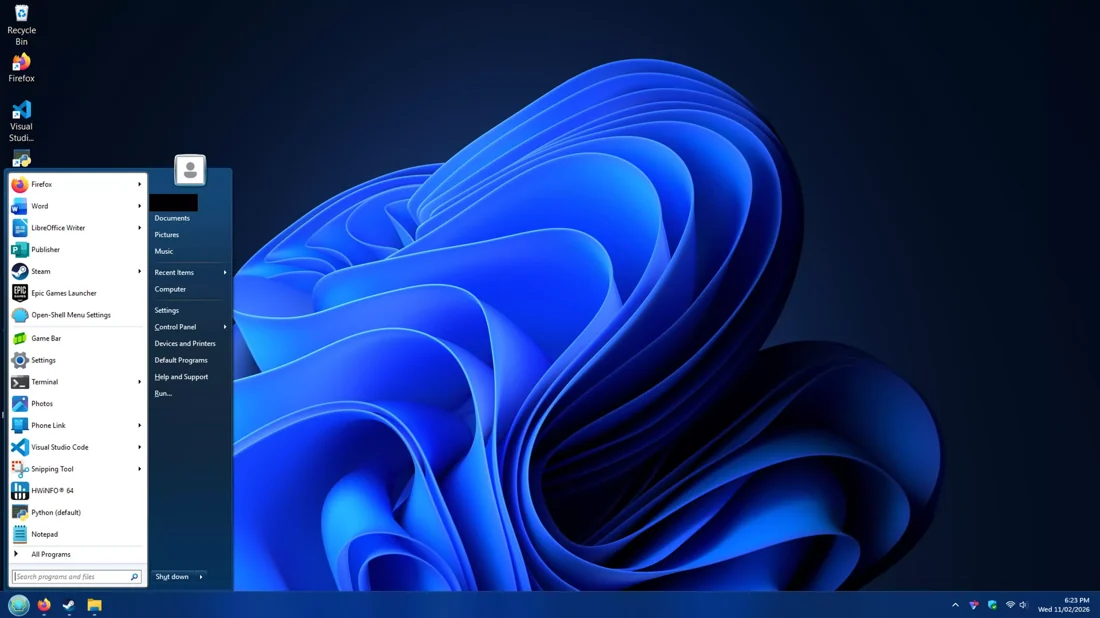
The names OpenShell, Open Shell, and Open-Shell Menu commonly refer to this same project in searches. This website organizes installation and configuration guidance; the program is maintained by the contributors linked on the GitHub project page.
Choose a familiar menu
Compare Classic, two-column, and Windows 7-style layouts. Start with a supplied style, then change the shortcuts and controls you actually use.
Keep the scope clear
A menu replacement is not a complete Windows downgrade. Check Explorer integrations, taskbar limits, and your exact OS build separately.
Release channels, without the guesswork
Published May 12, 2026. The release notes describe corrections to search selection, Japanese font names, and an Open/Save dialog issue after a Windows 11 update. Open-Shell 4.4.198 release notes.
The higher version number is not treated as the default stable download. Review stable versus preview guidance before changing channels.
Release labels checked October 30, 2026. The download is version-pinned, not an unverified moving file.
Get started with the right guide
How to install Open-Shell on a Windows PC
Install Open-Shell from the project release installer, choose the components you actually need, and then select a Start.
Open-Shell first-run setup checklist
For a predictable first run, select a built-in style, keep custom skins disabled, and establish which actions open.
Back up Open-Shell settings to XML
Use Backup > Save to XML File in the Open-Shell Menu settings dialog to export a configuration. Store the export in a.
Choose Classic, two-column, or Windows 7 menu style
Open-Shell provides three menu layouts: Classic, Classic with two columns, and Windows 7 style. Pick the navigation.
Download with a clear source
Download buttons call the provided FileDrop script. Before running any file, confirm its name, publisher signature and SHA-256 against the upstream Open-Shell release information.
Need the filename, SHA-256, or a no-JavaScript fallback? Open the download details.
Questions & answers
What is Open-Shell?
Open-Shell is a Windows shell-customization project best known for its classic Start menu. It is not a command-line shell or terminal application.
Is Open-Shell free?
The Open-Shell project is distributed under the MIT license. The linked project installer does not require a paid activation key.
Which download channel is used here?
The reference release on this site is stable Open-Shell 4.4.198. Check the received installer against the upstream release before running it.
Can I use it on Windows 10 or Windows 11?
The project describes both Windows 10 and Windows 11 use. Verify your exact build and the component you need; not every legacy Explorer feature applies to modern Windows.
Sources & scope
Documentation checked October 30, 2026. These instructions are documentation-led, not a claim of hands-on testing on your Windows build.